Wireless Mic
Checklist
Section titled “Checklist”Wireless mic setup checklist
This is a condensed checklist if you already know what everything does. For more info on each, read on below
Receiver
Transmitter
There’s 2 parts to this setup. The receiver and the mic itself. Let’s talk about the receiver side first.
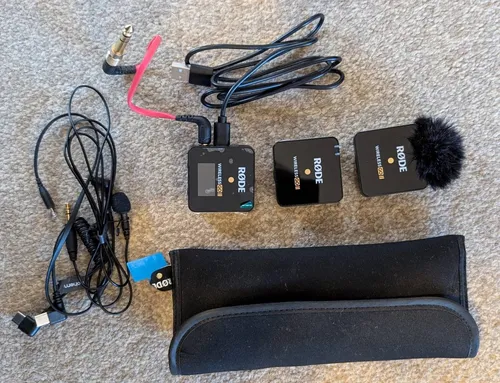
1. Receiver
Section titled “1. Receiver”The receiver is the one with a screen. The other two without the screen is the Transmitter.
The audio jack cable should be plugged into the Mixer, with the label: ‘Wireless Mic’.
The USB cable can be plugged to charge the device. We can use the extra USB slot in Audio recorder for this.
To turn it on, simply push the button on the top for a few seconds. Turning it off is the same.

2. Mic (Transmitter)
Section titled “2. Mic (Transmitter)”The transmitter is the one without any screen. There are two of these. Pick one.
Check battery
You’ll need to give this to the preacher. However, since this is battery powered, check if there’s enough battery on it. To do this, first, turn it on by holding the button until the light flashes (might be longer than you think).
Then, you can see the battery level on the Receiver’s screen. It should show either on the left or the right of the screen. The one on the center is the battery for the receiver itself.
After this is done, remember to turn it off before passing it to the preacher to conserve battery. If the battery is low, use the other transmitter and charge the one with low battery.
There are 2 parts to this. First is the transmitter which is the box above without a screen. And then the mic itself as seen below.
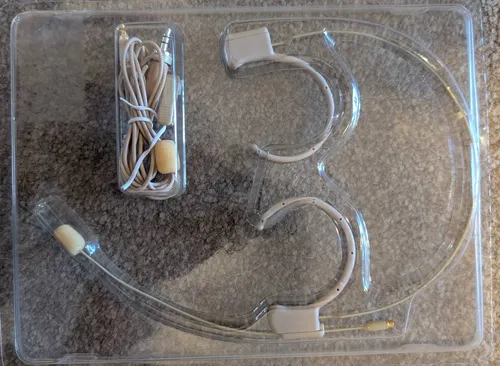
The mic comes with a cable that will need to be connected from the mic itself to the transmitter. Once this is setup, we can pass it on to the preacher. They will turn the device on themselves when they need it.
Step-by-Step
Section titled “Step-by-Step”-
Connect Receiver to Mixer
- Using the red cable & into the ‘Wireless mic’ slot in the Mixer
-
Charge Receiver
- Connect to the USB slot on the recording device
-
Turn on Receiver
- Simply hold the button long enough until the screen turns on
-
Check battery of transmitter
- As described above. Power it on & see the battery level through the receiver
- Make sure to turn it off again
-
Setup mic & transmitter, pass to the preacher
- As described above.